Version History

The full history of versions and changes for iA Presenter for MacOS.
| Version | Notes |
|---|---|
| 1.5 | New templates, layouts and export |
| 1.4 | Web Sharing |
| 1.3 | Unsplash, Export menu, Icon |
| 1.2 | Captions, aspect ratios, mobile layout |
| 1.0 | Public release: Welcome to iA Presenter |
| 0.0 | Beta versions |
iA Presenter 1.5.0
Version 1.5 brings a simpler, more focused iA Presenter for Mac.
- Improved layouts: streamlined to keep the focus on your message.
- New default template: black-and-white, distraction-free by design.
- Refined typography: better scaling, balanced spacing, and smaller default fonts for presentations that look professional on any screen.
- New Side-by-side PDF export
The full announcement is available here.
iA Presenter 1.5.1 Build - 15145
- Added: New XL text size option
- Improved: Highlights
- Fixed: Incorrect rendering of checklist items
- Fixed: Monospaced font for Code and Codeblocks
- Fixed: Incorrect speaker notes font size and style in PDF export
- Fixed: Missing footer in HTML export
- Fixed: Image titles turning lowercase when changing image size
- Fixed: Overlapping in Copenhagen theme
- Fixed: Broken layout with multiple images and text
- Fixed: Overlap in Style Inspector
- Fixed: Text potentially not visible in the editor
- Fixed: Background image not edge to edge on slide
iA Presenter 1.4.0
Introducing Web Sharing: Share fully responsive presentations online with anybody, on any device, anywhere.

Tap the Share icon on the upper right of the Inspector pane.
Read the full announcement on iA.net.
Version 1.4.0 - Build 14004
- Fixed: An error that occurred when updating a shared presentation without making changes.
Version 1.4.0 - Build 14003
- Release of Web Sharing.
iA Presenter 1.3.0
Unsplash Integration
Add high-quality photos in your presentations in one click.
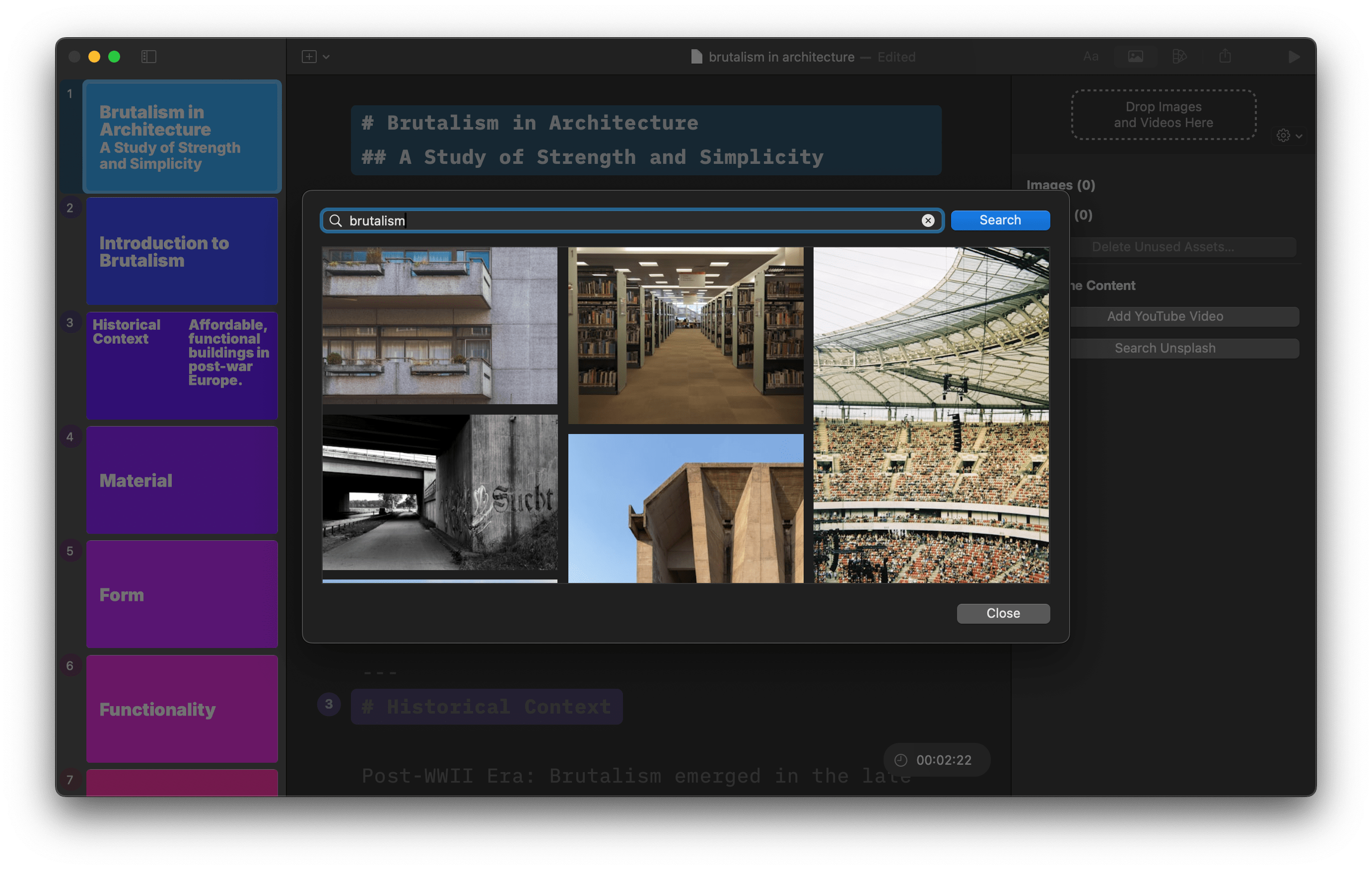
Presenter now lets you search for and insert Unsplash images directly into presentations. Easily find high-quality photos to use as content or backgrounds, without ever leaving the app.
Presenter automatically includes image metadata and adds attributions and captions directly to your slides using Content Block syntax.
Fine-tune your slides using iA Presenter's image syntax to add alignment, filters, and more!
A New Export Inspector
We've redesigned the export options to be more user-friendly and easier to find. The new Inspector lets you tweak exports with greater control.
We've also added the ability to export PDFs and images with specific aspect ratios, so you can get the exact output you need without changing your original design.
iA Presenter 1.2
Captions on Images
On the very top of your feature request list was the ability to add a small caption to an image, mostly, so one could easily cite its source.
It has been designed to let the maximum place for your photos and also supports slides with multiple images.
The syntax follows the one already used in iA Writer

New Aspect Ratios: AKA—iA Presenter for Your Social Networks
We have a growing set of users who are also taking advantage of iA Presenter for creating content on social media.
We added two new aspect ratios, Portrait 4:5 and Square 1:1 to match the format expected by networks like LinkedIn or Instagram.
We also improved the Export as Images feature to export your presentation for your social media networks in a couple of clicks.

Better Layout on Mobile
It’s no longer a secret, we are preparing an iOS version of iA Presenter. Even if you’re not part of the beta, you can already have sneak peek with this new version.
It includes an updated and enhanced layout for mobile devices.
Version 1.2 - Build 12020
- Added: Paste as Plain Text option
- Added: InternetAccessPolicy.plist to support LittleSnitch
- Added: Support for captions on images using content blocks
- Added: Ability to select the file format when exporting to images
- Added: Ability to add a prefix for files when exporting to images
- Added: Portrait and Square presentation sizes (using the dimensions expected by social networks)
- Improved: Behavior when files are stored in a cloud provider
- Improved: Layout on mobile
- Improved: Better support for kickers
- Improved: Background Color on grid layouts
- Improved: Support when pasting images copied from the Finder
- Improved: Aligned Text selection highlighting to system's settings
- Improved: Alerts to avoid overwrite when exporting a presentation to images
- Improved: Actions management on the Text Inspector
- Fixed: Inverted appearance for titles on Basel Theme
- Fixed: Incorrect auto-markdown for italic in titles
- Fixed: SVG images support in the handout PDF export
- Fixed: Excessive deletion when pressing the Enter key with a selected paragraph
- Fixed: License not recognized when moving from subscription to education
- Fixed: Issue when renaming assets with long filenames
- Fixed: Incorrect padding in split layout
- Fixed: Incorrect content example layout on Sonoma
- Fixed: Wrapped long words in code blocks
- Fixed: 9:16 PDF export inconsistent
- Fixed: Disabled smart dashes when inserting text from text operations
- Fixed: Incorrect layout with images and captions
- Fixed: Three returns no longer creates a slide
- Fixed: Avoided installing themes with an incorrect name
- Fixed: Incorrect spacing in title layout
- Fixed: Escaped $ symbol breaks rendering
- Fixed: Incorrect page size when exporting to PDF in Letter format
1.0 - Public Release
After more than six months of beta testing, iA Presenter 1.0 is ready. Thank you for helping us get here!
We’re rolling out purchases, subscriptions, and a 14-day trial. We’re looking forward to your feedback about the buying experience.
After years of development, shipping a version 1.0 means a lot to us. And yet, this is only the beginning.
Version 1.1.2 Build 11002
- Added: Chemistry equations support in KaTeX
- Added: Enabled the system caret on Sonoma
- Added: Sleep prevention when presenting
- Fixed: Typos in tooltips and menus
- Fixed: Accessibility descriptions
Version 1.1.1 Build 11001
- Fixed: Incorrect font size in PowerPoint export
Version 1.1.0 Build 10100
- Added: BETA: PowerPoint Exporter
- Added: BETA: Images Exporter
- Added: New infrastructure for beta versions
Version 1.0.2 Build 10002
- Added: Licensing for education
- Fixed: Incorrect background color when exporting speaker notes to PDF
Version 1.0.1 Build 10001
- Added: More levels of opacity for images
- Improved: Licensing system
- Improved: Kept dynamic slide color background even if there is a background image
- Improved: Open external links in default browser from Help
- Fixed: Image options for remote images
- Fixed: New presentation created multiple times
- Fixed: Incorrect syntax highlighting of inline code in the Editor
- Fixed: Issue in
Remove Themeoption in Settings - Fixed: Custom Presenter keys mapping not working with some combinations
- Fixed: Missing images when exporting to PDF for the 1st time under Ventura
Version 1.0.0 Build 10000
- Added: Licensing & trial system
- Improved: Edge aspect when using the blur filter on a background image
- Improved: Themes preference pane
- Improved: Add link command
- Improved: Initial launch process
- Fixed: Speaker notes visibility when starting by inline code
- Fixed: Incorrect text size when using highlight in headings
- Fixed: Issue when drag and dropping remote media from media manager
0.0 - Beta Versions
Version 0.9.1 Build 09177 - Beta 28
- Added: Physical Presenter keys mapping
- Added: Insert menu, to quickly insert a new slide with a template
- Added: Support of videos as background. Background videos autoplay by default
- Improved: Inspector redesign and polish
- Improved: Support of images hosted in Dropbox
- Fixed: Scrolling appearing when using multiple images in a visual block
- Fixed: Themes not reloading when installing a new one
- Fixed: Layout discrepancies with img on top of titles
Version 0.9.1 Build 09176 - Beta 27
- Updated: Format menu to follow Text inspector structure
- Fixed: Issue where title could overlap toolbar buttons
- Fixed: Issue where the creation of new document can fail
- Fixed: Incorrect slide number with empty slides
Version 0.9.1 Build 09175 - Beta 26
- Added: Support for links in PDF exports
- Improved: Mobile support when exporting to Html
- Improved: Toolbar icons
- Improved: No more automatic new slide insertion when pressing
Enterwhen inside a code block - Redesigned: About Dialog
- Updated: Help
- Fixed: Auto-updater not finding updates under Ventura
- Fixed: Inconsistent highlighting of inlines in the Editor
- Fixed: Incorrect selected slide on right/ctrl click
- Fixed: Remaining dashes when deleting the first slide
- Fixed: Potential crash on empty presentations
- Fixed: non visible background images when name was containing quotes, parentheses or space
- Fixed: Incorrect appearance in New York Theme
- Removed: Accent color customisation
Version 0.9.1 Build 09170 - Beta 25
- Improved: Formatting commands
Version 0.9.1 Build 09169 - Beta 24
- Improved: Better handling of strong emphasis + emphasis formatting
- Updated: Keyboard shortcut for inline math to avoid conflict on Qwerty
- Fixed: Insured all media are loaded before exporting to handout
- Made Text Document with Image the default PDF export option
- Fixed: Potential crash in code block containing special unicode characters.
- Fixed: Incorrect deletion of temporary files
Version 0.9.1 Build 09165 - Beta 23
- Added: "small dynamic" text sizing mode
- Added: CSS class when slide has an image background
- Added: CJK support for speaking time
- Added: Support for image opacity
- Added: Support for image filters
- Improved: Theme layouts thumbnails with background images
- Improved: Task list readability
- Fixed: Incorrect block-quote conversion on speaker notes
- Fixed: Math rendering issue in titles using the Paris theme
- Fixed: Multiple issues leading to unwanted document reload, especially when using cloud providers.
Version 0.9.1 Build 09163 - Beta 22
- Added: Kickers using
hgroup - Added: Allowed slide navigation commands to also work when presenting
- Added: Media renaming when pressing the
Enterkey in media manager - Added: Support for math in the teleprompter
- Added: Support for math in handout PDF export
- Improved: Slovene/ Croatian font support in Milano
- Improved: Auto-hide traffic lights on presentation window
- Improved: KaTeX font size to better match default text
- Improved Markdown export process
- Changed: No more exit presentation mode when closing the presentation window
- Fixed: Fixed background images not rendering in some themes
- Fixed: Fixed incorrect font if font name contains a space
- Fixed: Incorrect slide appearance when using invert
- Fixed: Prevented incorrect file names when renaming assets
- Fixed: Avoided horizontal scrolling in teleprompter
- Fixed: Incorrect paddings when using a video with the caption layout
Version 0.9.1 Build 09161 - Beta 21
- Added: Option to select an image when clicking on the drop area
- Improved: Processed local media thumbnails with QuickLook
- Improved: Inlines parsing
- Improved: Blockquotes rendering
- Improved: Better editor window frame memorization
- Improved: Support of Youtube videos having a starting time
- Fixed: Always process assets hashing in the background
- Fixed: Typo in default presentation
- Fixed: Empty lines rendering in code blocks
- Fixed: Paste not working when remapped in System Preferences
- Fixed: Smart punctuation
- Fixed: Crash when pasting special Unicode characters
- Fixed: Progress not working when exporting the handout
- Fixed: Incorrect file type after importing text documents
- Fixed: Color picker not updating the second time
- Fixed: Potential crash when presenting
Version 0.9.1 Build 09159 - Beta 20
- Added: Support for background images inclusing size and position
- Added: Quicklook Preview using Spacebar when media is selected in the Inspector
- Added: Ability to reset the presentation timer
- Added: CSS class to define the context
- Changed: Blockquotes are now speaker notes by default again
- Changed: Monospaced font for math blocks
- Improved: New Highlight rendering in slides
- Improved: Better accuracy in PDF export progress
- Improved: Proper Stop Presentation button
- Improved: Moved inline math detection to markdown.framework
- Improved: Code blocks readability
- Fixed: Empty footnotes references
- Fixed: Potential loss of assets in specific situations
- Fixed: Incorrect videos paths for exporting to HTML
- Fixed: Crash when adding a new slide after a codeblock at the end of a presentation
- Fixed: Bold support in titles
- Fixed: Consecutive math blocks not rendering
- Fixed: Incorrect appearance when matching system appearance
- Fixed: Incorrect presets default file when creating new Theme
- Fixed: Missing Line Breaks for PDF Export
- Fixed: Multiple typos
- Fixed: Blinking code blocks under Ventura
- Fixed: Incorrect selected theme at startup
Version 0.9.1 Build 09156 - Break-fix
- Fixed: Crashes when presenting or changing aspect ratio.
Version 0.9.1 Build 09155 - Beta 19
- Added:
Cmd + Rshortcut to toggle preview. - Changed: Made blockquotes visible by default.
- Changed: Made links not visual
- Changed: Increased the size of the logo in header/footer
- Improved: Better styling of blockquotes.
- Improved: Allowed images having a
?in their url. - Improved: Reminds last size and position of presentation window during the same sessions
- Improved: Increased dimensions of slides when they are copied as image.
- Improved: Performances at startup
- Fixed: Incorrect body font definition for template in the Inspector.
- Fixed: Missing headers/footer on html export.
- Fixed: Incorrect icon color.
Version 0.9.1 Build 09154 - Beta 18
- Improved: Bundle storage engine.
- Improved: Memory consumption.
- Fixed: Minor Themes issues.
Version 0.9.1 Build 09152 - Break-fix
- Fixed crash at startup under Ventura beta.
- Fixed an issue where existing presentations appear as empty.
- Fixed crashes when changing image mode at the end of a presentation.
- Improved Speaking Time Control font caching.
Version 0.9.1 Build 09151 - Beta 17
This version introduces a new bundle file format.
Existing presentations in zip format can still be open using the new beta. We recommend backing them up before opening and saving them into the new file format.
- Added: New export progress and notification system.
- Added: Option to deactivate controls on videos
- Improved: Made version number selectable in About dialog + prepopulate email with version numbers in
Help→Contact Us. - Improved: Code blocks contrast.
- Updated: Default presentation.
- Fixed: Math blocks not centered.
- Fixed: Incorrect code block background in editor.
- Fixed: Incorrect font size in lists containing
<br> - Fixed: Incorrect colors (bold, links, ...) in Themes.
- Fixed: Playback of newly added local videos
- Fixed: Support for renaming bundles in Finder while open in Presenter
- Added : Support for nested lists in speaker notes
- Improved: New PDF export Handout CSS
- Fixed: Incorrect detection of inline math
- Fixed: Incorrect selected slide after drag and drop ordering
- Fixed: Incorrect selected slide after renaming media
- Fixed: Notes not visible when exporting to PDF
- Fixed: Incorrect
Format->Task Listcommand mapping - Fixed: Crash under Ventura Beta 7
- Fixed: Incorrect TextView layout under Ventura beta 8
Version 0.9.1 Build 09146 - Beta 16
- Added: New set of Themes
- Added: Speaking time
- Added: Option to clear image cache
- Added: Gradients in Layout Picker thumbnails
- Added: Automatic RevenueCat reconnection after defaults deletion
- Added: Better automarkdown for footnote and references
- Added: Support for Body text colors
- Added: Support for Accent colors
- Added: Search in Help for menu items
- Updated: New default presentation
- Updated: Made San Francisco the default Theme
- Updated: Migrated to Md.framework for more accurate and efficient inlines processing
- Improved: Preferences look and feel
- Improved: Inspector labels
- Fixed: Autolayout bug for slide having 1 images and 3 visual blocks
- Fixed: Autolayout bug not showing a part of the slide
- Fixed: Incorrect Tab width for visual text
- Fixed: Incorrect colors in Tables
- Fixed: Delay in media list update
- Fixed: Ensured Safari settings were not interfering with autoplay settings
- Fixed: Separators in Text Inspector
- Fixed: URLs detected as visible text when they are not content blocks
- Fixed: Missing note after image in PDF Handout export
- Fixed: Incorrect text size in Editor causing crash
- Fixed: Incorrect styling in editor when editing headings
- Fixed: Titlebar not visible when search bar is visible
Version 0.9.1 Build 09143 - Beta 15
- Redesigned: Inspector
- Redesigned: Preferences
- Added: Support for smart ponctuation
- Added: Support for Theme level CSS classes (for coming themes)
- Changed: Comments from @ to //
- Changed: Inline math shortcut
- Changed: PDF export to new Webkit API
- Fixed: Underscore based emphasis
- Fixed: Focus mode
- Fixed: Crash when changing image mode
- Fixed: Warning in slide style inspector
- Fixed: Responsive slide rendering when there is no monitor connected
- Fixed: Incorrect shortcut for comments
Version 0.9.1 Build 09141 - Beta 14
- Updated: App Icon
- Updated: Default presentation
- Improved: Handout PDF Export improvements (Floated single image, Grid layout for multiple images)
- Added: Layout Picker
- Added: Option to disable focus mode in teleprompter
- Added: Select thumbnail on right click
- Fixed: Descenders clipping on title slides
- Fixed: Incorrect autolayout rendering
- Fixed: Incorrect image resizing mode in v-split-layout
- Fixed: Allowed up to 3 leading spaces in ATX headings
- Fixed Incorrect line height in title slides
- Fixed: Slide break menu & shortcut
- Fixed: Mobile presentation size to accommodate with existing media queries
- Fixed: Incorrect youtube video id when we have extra parameters in URL
- Fixed: Youtube iframe layout
- Fixed: Crash when changing image size and position
- Changed: Moved the ability to open
.mdand.txtfiles to the Import option - Removed: Legacy format menu options
Version 0.9.1 Build 09136 - Beta 13 - Breakfix
- Fixed: Crash when changing image mode
- Fixed: Bug preventing opening certain documents
- Fixed: Issue causing incorrect display of CJK characters
Version 0.9.1 Build 09135 - Beta 13
- Added: Support for tiff image format
- Added option to swap arrow keys when presenting (physical presenter device)
- Improved: Syntax highlighting & textview performances.
- Improved: Inspector segmented control in toolbar
- Improved: Footnotes rendering in slide
- Improved: Menu Titles
- Improved: Better margins in textView
- Improved: Default presentation text
- Improved: Better looking checkboxes in teleprompter
- Improved Caret position when changing line prefix (headings, block quote,...)
- Updated: App icon
- Fixed: Incorrect text size under Ventura
- Fixed: Incorrect shortcut or ordered lists
- Fixed: Incorrect selected segment when swiping Inspector
- Fixed: Crash when removing slides in a presentation with lot of slides
- Fixed: Incorrect autosave of metadata
- Fixed: Text not visible under Ventura
- Fixed: Export to HTML not respecting filename
- Fixed: Incorrect code blocks background in editor
- Fixed: Crash when changing image mode
- Fixed: Crash when deleting the entire presentation text
- Fixed: Readability of show preview button
- Fixed: Incorrect Tooltips shortcuts
- Fixed: Document reversion
- Fixed: Bug when slide where not updating properly
- Fixed: Bug when deleting text at the end of the document
- Fixed: Multiple issues in HTML export (Custom CSS variable, gradient backgrounds, image positions)
- Fixed: Unordered list icon
- Fixed incorrect preview update when changing headers/footers
- Fixed Themes list update when installing or removing themes
Version 0.9.1 Build 09129 - Beta 12
- Added: Readonly mode when app is not licensed not in Trial
- Added: Support for SVG in assets manager
- Improved: Inspector pane switching performances
- Improved: Assets thumbnails quality on non retina screens
- Improved: Teleprompter Look & Feel with two different modes
- Improved: Toolbars layout
- Fixed: Incorrect line height with CJK Input Method & line height calculation refactoring
- Fixed: Incorrect Show/Hide thumbnails shortcut
- Fixed: Incorrect update of preview when changing CSS variables
- Fixed: No more allow to toogle inspector and thumbnails in teleprompter mode
- Fixed: Bug in asset deletion
- Fixed: Youtube videos opening in an external browser window
- Fixed: Allowed empty new presentation template
- Changed: Shortcut to toggle presentation mode
Version 0.9.1 Build 09123 - Beta 11
- Added: Ability to toggle spoken text in Inspector
- Improved: Teleprompter
- Improved: Better navigation between slides and notes
- Fixed: Dynamic background Colors
- Fixed: Potential overlapping in titlebar
- Fixed: Blank line artefact in thumbnails
- Fixed: Math blocks generation
Version 0.9.1 Build 09114 - Beta 10
- Added: Totally refactored
.mdand.txtimport with better assets management. - Added: Option to autoplay videos
- Improved: Prevented change of extension when renaming files
- Improved: Prevented horizontal scrolling in teleprompter with long lines
- Improved: Toolbar reorganization
- Improved: Main menu reorganization
- Improved: Presentation pane cleansing in Preferences
- Improved: Caret color
- Improved: Windows automatic placement
- Improved: Vertical alignment of image alignment dropdown
- Fixed: Incorrect line-height with big font sizes
- Fixed: Animation behavior of presentation window
- Fixed: Potential crashed and smaller fixes
- Fixed: Typo in Help
- Fixed: Thumbnails randomly blank
- Fixed: Incorrect slide height when exporting to PDF
- Fixed: Ensured speaker notes background is white when exporting to PDF
- Fixed: Ensured thumbnails have the right background when adding/removing/reordering slides
- Fixed: Incorrect presentation window layout with MBP having a notch
Version 0.9.1 Build 09105 - Beta 9
- Added: Support for Themes descriptions.
- Improved: Ensured slide numbers in thumbnails can have 3 digits.
- Improved: Themes update.
- Fixed: Slowness when editing with a lot of emojis.
- Fixed: Issue with image drag and drop.
- Fixed: Incorrect font size when using a non responsive slide size.
Version 0.9.1 Build 09104 - Beta 8
- Added: Dynamic (gradient) backgrounds support in Tokyo theme.
- Added: Support for paste image from clipboard.
- Added support for PDF thumbnails in assets manager
- Improved: Prevented to directly save to
.mdbut to use export instead. - Improved: PDF support as image + udated help accordingly.
- Improved: Proposed asset name when requested name already exists.
- Fixed: Incorrect url escaping when containing
?. - Fixed: Auto-layout with footnotes.
- Fixed: A bug preventing the display of assets from Theme in asset manager.
- Fixed: Paste slide at index 0.
- Fixed: PDF export when using the mobile presentation size.
Version 0.9.1 Build 09102 - Beta 7
- Fixed: Invisible checkmark if the slide is using dark mode.
- Fixed: Issued when the first paragraph of the slide containing a
:was not shown on the slide. - Fixed: Intro video not able to play again after being closed a first time.
- Fixed: Issue preventing the presentation window to be shared using Zoom (and potentially other web meeting apps).
- Fixed: Autolayout when using videos.
- Fixed: Spaces in code blocks are not preserved.
- Fixed: Incorrect scaling of wide equations.
- Fixed: Incorrect output when exporting to PDG with the phone presentation size.
- Fixed: Incorrect caret location after exiting presentation mode.
- Fixed: Prevented a crash when presenting.
- Fixed: Incorrect behavior when setting heading level using format commands.
- Improved: Local images linked from a
.mdor.txtare now automatically added to the.iapresenterduring import. - Improved: Disabled auto-suggest in math and code blocks.
- Added: Help sections for graphics & files.
- Added: Per slide navigation when presenting using
←and→keys. - Added: Button to swap screen if presenting with multiple monitors.
Version 0.9.1 Build 09101 - Beta 6
This is a small breakfix version fixing a couple of crashes and a text scaling bug.
- Fixed multiple crashes.
- Better overflow support for images in v-split layout (text scaling issue)
- Added "prefetch" for images.
Version 0.9.0 Build 09099 - Beta 5
- Added Help Viewer and basic help including how to create a custom Theme.
- Teleprompter fixes.
- Fixed incorrect aspect ratio in thumbnails.
- Fullscreen presentation mode fixes including better support for screens with a notch.
- Fixed capped thumbnails in fullscreen mode.
- Fixed space key not working after presenting.
- Added a way to generate boilerplate code for new Themes.
- Fixed an auto-layout bug.
- 3-cells grid layout moved to a 3 columns layout.
- Better lines continuation inside visuals blocks.
- Fixed titlebar visibility.
- Improved support for lists.
- Improved windowed mode support when presenting with multiple monitors.
Version 0.9.0 Build 09096 - Beta 4
- Added more CSS classes to slides for further customization
- Considered lines with a single tab as non-empty lines
- Aligned highlight and strikethrough format attributes in Text Inspector
- Made preview button more visible on thumbnails
- Added support for multiple paragraphs in formatting
- Fixed edge cases when drawing the first slide number in textview
- Fixed a text scaling bug when text is bottom aligned
- Better error handling and reporting when opening non-readable text files
- Updated KaTeX
- Fixed issues and improved Math handling
- Fixed issues and improved Code handling
- Fixed incorrect rendering of inlines (highlight, code, math) backgrounds in textview
- Added single return starts a new paragraph option
- Fixed Ordered lists numbering in the teleprompter
- Fixed Incorrect cursor
- Custom themes installation fixes and improvements
Version 0.9.0 Build 09095 - Beta 3
- Made presentation mode shortcuts working whatever is the focussed element.
- PDF & HTML export improvements
- Fixed crashes
- HTML export fixes
- Fixed incorrect code/math format command in Text Inspector
- Added support for task lists
- Changed keyboard shortcuts to go to first/last slide
- Improved default new presentation content
- Fixed Incorrect layout when folding preview on style inspector
- Improved teleprompter
- Always included muted slide in teleprompter
- Better font weight and line spacing in teleprompter
- Added hanging-punctuation for notes in teleprompter
- Monospaced font in timer
- Added
Xkeyboard shortcut to swap screens when presenting with multiple monitors - Fixed remaining text selection between slides in preview mode
- Added Dynamic (optional) placeholder when slide has notes but no visual content
- Added dynamic instructions when setting a logo
- Added support for alternative urls for YouTube videos
- Fixed a crash when totally deleting presentation contents
- Fixed
⌘ + ⇧ + Pshortcut when slides are focussed
Version 0.9.0 Build 09093 - Beta 2
So, we have been at work since the last Beta. But we have not been sleeping. iA Speaker is now called iA Presenter and it now comes with a:
- New syntax
- Newly designed, clear difference between visual and spoken
- Simplified structure no more slide parts/modules
- New teleprompter
- Autolayout (no need to pick layouts, it just does it)
- Markdown Import
- More Export formats and layouts
- Support for transitions
- Content blocks with images positions
- New Inspector
- Better asset management (drag and drop from browser, web support, renaming, YouTube videos, ...)
- The ability to delete unused images and rename Screenshot-dhdgsg-9-4-3.png
 Help
Help

FAQ
More than 50% of the requests we receive have their answer here. Please check it before reaching out.

Troubleshooting
Here are some things you can do if iA Presenter acts in unexpected ways.
Purchase & Payments
How to buy iA Presenter, manage subscriptions, get receipts and invoices, and update your details.
Accessibility
If you find areas of our app where we could provide a more inclusive experience, we'd love to hear from you.

Privacy Policy
The Privacy Policy for the iA Presenter software product family by Information Architects, Inc.